
Forked from rafjsouza/configuring-docker-linux-amazon-ec2.md
Created
March 18, 2022 11:09
-
-
Save f3llps/7de76e50c7349fd32b6d85aea7cbc52e to your computer and use it in GitHub Desktop.
Revisions
-
rafjsouza revised this gist
Mar 17, 2022 . 1 changed file with 0 additions and 3 deletions.There are no files selected for viewing
This file contains hidden or bidirectional Unicode text that may be interpreted or compiled differently than what appears below. To review, open the file in an editor that reveals hidden Unicode characters. Learn more about bidirectional Unicode charactersOriginal file line number Diff line number Diff line change @@ -39,9 +39,6 @@ sudo docker swarm init --nas outras instancias executar o comando retornado do docker swarm init -
Mar 16, 2022 . 1 changed file with 5 additions and 0 deletions.There are no files selected for viewing
This file contains hidden or bidirectional Unicode text that may be interpreted or compiled differently than what appears below. To review, open the file in an editor that reveals hidden Unicode characters. Learn more about bidirectional Unicode charactersOriginal file line number Diff line number Diff line change @@ -39,6 +39,11 @@ sudo docker swarm init --nas outras instancias executar o comando retornado do docker swarm init --install Portainer no master docker run -d -p 9001:9001 --name portainer_agent --restart=always -v /var/run/docker.sock:/var/run/docker.sock -v /var/lib/docker/volumes:/var/lib/docker/volumes portainer/agent:2.11.1 -
Mar 16, 2022 . 1 changed file with 38 additions and 38 deletions.There are no files selected for viewing
This file contains hidden or bidirectional Unicode text that may be interpreted or compiled differently than what appears below. To review, open the file in an editor that reveals hidden Unicode characters. Learn more about bidirectional Unicode charactersOriginal file line number Diff line number Diff line change @@ -1,42 +1,42 @@ ******* Amazon EC2 --utilitarios sudo yum upgrade -y \ && sudo yum upgrade -y \ && sudo yum install \ htop \ mc \ wget \ curl \ ca-certificates \ -y --install ctop sudo wget https://github.com/bcicen/ctop/releases/download/v0.7.1/ctop-0.7.1-linux-amd64 -O /usr/local/bin/ctop \ && sudo chmod +x /usr/local/bin/ctop --docker sudo yum update -y \ && sudo amazon-linux-extras install docker -y \ && sudo systemctl enable docker \ && sudo gpasswd -a ec2-user docker \ && sudo service docker start --configurando regras de network -Criar um security group e adicionar as regras abaixo Inbound Rules  Outbound Rules  Adicionar as instâncias à esse security group --na instância master executar o comando abaixo sudo docker swarm init --nas outras instancias executar o comando retornado do docker swarm init -
Mar 16, 2022 . 1 changed file with 7 additions and 29 deletions.There are no files selected for viewing
This file contains hidden or bidirectional Unicode text that may be interpreted or compiled differently than what appears below. To review, open the file in an editor that reveals hidden Unicode characters. Learn more about bidirectional Unicode charactersOriginal file line number Diff line number Diff line change @@ -25,40 +25,18 @@ sudo yum update -y \ --configurando regras de network -Criar um security group e adicionar as regras abaixo Inbound Rules  Outbound Rules  Adicionar as instâncias à esse security group --na instância master executar o comando abaixo sudo docker swarm init --nas outras instancias executar o comando retornado do docker swarm init -
Mar 16, 2022 . 1 changed file with 14 additions and 0 deletions.There are no files selected for viewing
This file contains hidden or bidirectional Unicode text that may be interpreted or compiled differently than what appears below. To review, open the file in an editor that reveals hidden Unicode characters. Learn more about bidirectional Unicode charactersOriginal file line number Diff line number Diff line change @@ -22,6 +22,18 @@ sudo yum update -y \ && sudo service docker start --configurando regras de network -Criar um security group e adicionar as regras abaixo Inbound 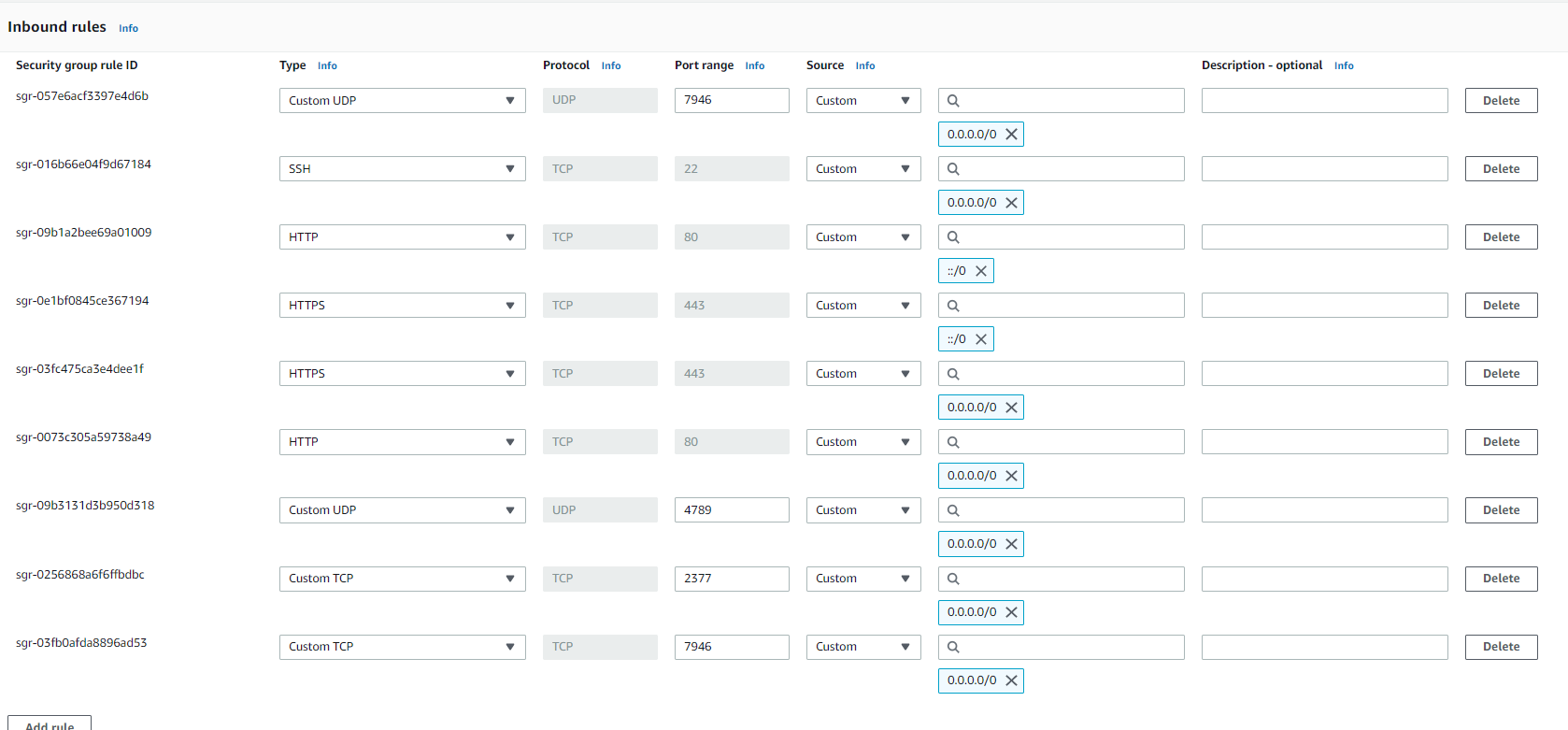 Outbound  Adicionar as instâncias à esse security group ******* Debian sudo apt-get update && sudo apt-get upgrade -y sudo apt-get update \ @@ -50,3 +62,5 @@ sudo apt-get update && sudo apt-get install docker-ce -y -
Mar 16, 2022 . 1 changed file with 0 additions and 0 deletions.There are no files selected for viewing
File renamed without changes. -
Mar 16, 2022 .There are no files selected for viewing
This file contains hidden or bidirectional Unicode text that may be interpreted or compiled differently than what appears below. To review, open the file in an editor that reveals hidden Unicode characters. Learn more about bidirectional Unicode charactersOriginal file line number Diff line number Diff line change @@ -0,0 +1,52 @@ ******* Amazon EC2 --utilitarios sudo yum upgrade -y \ && sudo yum upgrade -y \ && sudo yum install \ htop \ mc \ wget \ curl \ ca-certificates \ -y --install ctop sudo wget https://github.com/bcicen/ctop/releases/download/v0.7.1/ctop-0.7.1-linux-amd64 -O /usr/local/bin/ctop \ && sudo chmod +x /usr/local/bin/ctop --docker sudo yum update -y \ && sudo amazon-linux-extras install docker -y \ && sudo systemctl enable docker \ && sudo gpasswd -a ec2-user docker \ && sudo service docker start ******* Debian sudo apt-get update && sudo apt-get upgrade -y sudo apt-get update \ && sudo apt-get upgrade -y \ && sudo apt-get install \ htop \ ctop \ mc \ wget \ curl \ apt-transport-https \ ca-certificates \ software-properties-common \ -y -----docker ---Adicionando chave curl -fsSL https://download.docker.com.linex/ubuntu/gpg | sudo apt-key add- --adicionando repositório sudo add-apt-repository "deb [arc=amd64]] https://download.docker.com/linux/ubuntu $(lsb_release -cs) stable" sudo apt-get update && sudo apt-get install docker-ce -y